The Upload Box Won't Take Your Resume: Free St. Louis Computer Help Before You Pay for a Class
Revised October 20, 2026
Where can I learn basic computer skills for beginners in St. Louis?
Start at the library. The St. Louis Public Library’s Tech Connect books one-hour, one-on-one tech appointments, including job search and resume help, and St. Louis County Library Digital Navigators take appointments too. Job-seekers can add no-cost workshops at SLATE’s Missouri Job Center.
Keep reading ↓Where did the resume go? At a public computer in a St. Louis library, the box on the screen says “Upload your resume,” and you have no idea where the file went. You saved it. You know you saved it. The cursor blinks, the little wheel spins, and somewhere behind you a printer coughs out somebody else’s pages. Your neck is hot. You close the tab and tell yourself you’ll try again tomorrow, which is what you said yesterday. Your bus comes in twelve minutes. The application doesn’t care.
Before you pay anyone to fix that, know this: the City of St. Louis runs a job agency, SLATE, that offers financial assistance for training programs in high-demand, high-growth occupations, help that can cover tuition, books and supplies. Its Missouri Job Center also runs no-cost workshops on resume writing, online job search and succeeding on hiring tests, the timed online test that can stand between you and an interview.
Screenshot that before you pay for any computer course in St. Louis: the city may help cover it. Ask first. Pay second.
Where can I learn basic computer skills for beginners in St. Louis?
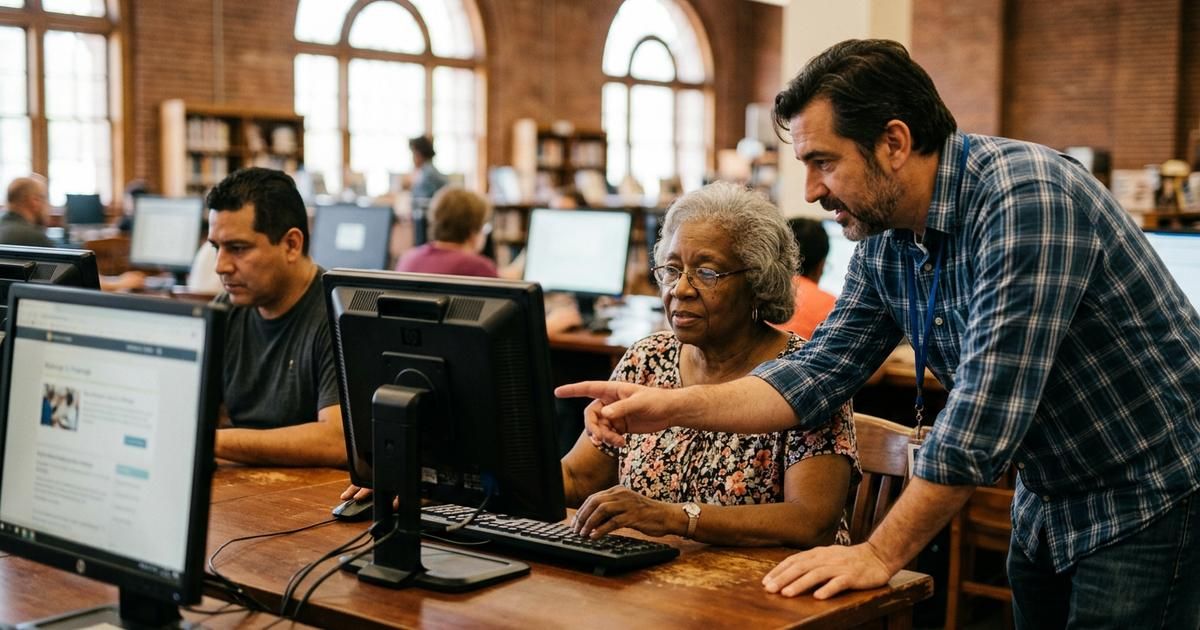
Start at the library. The St. Louis Public Library’s Tech Connect program books in-person or virtual one-on-one appointments for technology help, scheduled for one hour, and its listed topics include searching for jobs online and basic resume writing. The St. Louis County Library has Digital Navigators who take appointments for computer and mobile device learning; fill out the form and they contact you within four weekdays to schedule. Neither one expects you to know anything when you walk in.
One change most guides haven’t caught, at the city library: St. Louis Public Library announced its hotspot checkout would end on February 28. Over $4 million in federal Emergency Connectivity Fund grants paid for it, and that federal funding has ended. If your cousin is about to ride the bus downtown for a library hotspot, text her this first, and tell her to reserve a library computer instead.
One-on-one beats a big class when you’re nervous, because the whole hour is your problem, not the room’s. Bring your own phone or laptop and a written list: the email you can’t open, the password you keep losing, the resume file that vanishes every time you hit save. Sit down, put the list on the table between you, and work it from the top.
Start one rung lower than you think you need to. There’s no shame in sitting through “this is a folder, and this is where your saved file actually goes.” That one lesson ends more of the upload-box panic than any spreadsheet class ever will.
The free training money most people never ask about
If you are aiming past the basics, at a certificate or a real career change, go to SLATE before you pay anybody. The Missouri Job Center at 1520 Market Street downtown has resource rooms with computers, internet, printers and phones for your job search, plus workforce staff who specialize in career transitions. Register on MoJobs first, which SLATE calls the first step for job seekers, then call (314) 589-8000 and ask one plain question: “Do I qualify for training assistance?” If the answer is no, you’ve spent one phone call.
SLATE says its training programs help St. Louisans who are minorities, women and long-term unemployed get into careers in growing industries. If that’s you, the money is meant for you. Walk in with your ID, a rough resume on a thumb drive, and the one job posting that made you think “I could do that if I knew Excel.” That posting is your syllabus. Fold it in half, set it next to the keyboard in the resource room, and let every question you ask start with a line on that page.
The handful of skills worth learning first
Every application that ever beat you has one of these five underneath it. The mouse that skates off the edge of the form, so learn mouse and keyboard control until clicking stops eating your attention. The resume that vanished, so learn files and folders. The job site that wanted you to search, filter and scroll, so learn a web browser. The “attach your resume” email that went out naked, so learn email with attachments. And the too-good message from a “recruiter” at 11 p.m., so learn internet safety: real passwords, and which links never to click.
Files and folders comes first for a reason. The afternoon you click Downloads and the resume is just sitting there, where it was the whole time, you’ll laugh out loud in a quiet library and nobody will mind. Tell anyone stuck at that upload box what took you weeks to learn: the upload box was never the test. The folder was.
How much does a computer course cost in St. Louis?
It ranges from free to a few thousand dollars, and the price tracks the goal. SLATE’s workshops are no-cost. Community-college continuing-education courses usually carry a modest fee. Job-focused certificates cost more, and multi-week bootcamps sit at the top. Confirm current pricing directly with the provider before you commit, and ask SLATE about assistance before you pay a dime toward anything job-focused.
Two costs people forget. First, a device: a class teaches the skill, but you still need somewhere to practice. Second, time. A free class you can actually reach two evenings a week beats an expensive one across town that you’ll quietly stop attending by week three. Match the schedule to the shift you actually work. If you close at the restaurant and open at the store, a Saturday-morning appointment you can keep is worth more than a weeknight class you’ll miss twice and then drop. Look at the bus route too. A class that takes two transfers in January stops being a class by February. Choosing among options works a lot like weighing tutoring and learning centers across the metro: fit and pace matter more than the brochure.
Need the car to pass before the new job starts? Here’s what fails a Missouri car inspection near St. Louis.
Where can seniors learn basic computer skills for free?
The same library appointments work beautifully for older beginners, because nobody rushes you and nobody grades you. Bring the grandkid’s text you couldn’t open and the bank login that locked you out. Write each step in a spiral notebook while the helper talks, then do it again yourself before you leave. The second time is when it sticks.
Ask a grandkid or a neighbor to sit with you for the first practice session at home, but keep your hands on the mouse. Helpers mean well and then do it for you, fast, and you’re left watching instead of learning. Say it kindly and out loud: “Tell me, don’t touch.” It feels awkward for about four minutes and then it works. Practice the same small task three days in a row, open the email, open the attachment, save it, find it again, before you move on to anything new.
Learning this later in life isn’t harder, just different, and confidence is usually the real barrier rather than ability. Give yourself permission to book a second appointment for the same question. Staying connected online is also part of flexible work and earning for seniors, if that’s where you’re quietly heading.

People are asking
Is there a computer class in St. Louis built just for older adults?
There is: Oasis, a nonprofit for older adults, runs tech classes designed for older learners out of the Center of Clayton at 50 Gay Avenue, 314-862-4859. The topic list reads like that spiral notebook: getting started with smartphones, desktops, laptops and tablets, email, texting and video calls, one-on-one support, and staying safe online from scams. Here’s one for the bridge club: Oasis itself launched at the Famous Barr downtown. Ask about the price and the next start date when you call.
Work backward from the job, not forward from the course catalog
First, drop the idea that you’re behind because you’re slow. It’s the grind, built into nearly every job worth applying for now. The National Skills Coalition found that 92% of jobs analyzed require digital skills, and its earlier research found that one-third of workers don’t have the foundational digital skills those jobs assume. The warehouse lead in Florissant whose job just got a scanner and a tablet, the parent in St. Charles coming back after ten years at home, the retiree in Webster Groves whose doctor only answers through a portal: same wall, same blinking cursor.
Print the posting you actually want. Take a highlighter to every piece of software it names. That yellow list is the whole curriculum. The quiet mistake job-seekers make is buying the biggest, most expensive program out of anxiety, when the listing only asked for email, a word processor and a basic spreadsheet. If the role wants ordinary office skills, a short continuing-education sequence is usually plenty. If you’re aiming at a technical field, a certificate or bootcamp may be worth it, but only once the basics underneath are solid.
Three tiers, three purposes. Continuing-education courses teach specific skills quickly and cheaply, right for most office roles. Certificate programs, often through a public community college, go deeper and put a credential on your resume. Bootcamps are intensive and pricey, aimed at career changers heading into tech, and they deserve a careful decision rather than a hopeful impulse at midnight.
Here is a simple test before you sign anything with a price tag. Ask the school to put you in touch with a recent graduate, then ask that person one question: what job did you land, and how long did it take? A good program answers that without flinching. A shaky one changes the subject to its brochure. Your money and your evenings are too scarce to spend on a promise you can’t check.
Before you enroll anywhere, ask what software the course covers and get it in writing. Ask what a graduate can actually do afterward, whether it’s hands-on or mostly lecture, the total cost including materials, and what help exists once you finish. Once your skills are sharp, learn what a data entry job in St. Louis really involves, and browse jobs near St. Louis to apply for to see which skills keep showing up.
When you’re ready to apply, the St. Louis jobs board lists local openings, and our roadmap to local careers across the region helps you aim. The day the upload box takes your resume on the first try, you’ll hear the little click of the button and feel it in your chest. That’s the moment this whole thing is for.
Book the library hour first, then shop for the class. Once you know what you need, compare computer training schools across the St. Louis metro and carry the same questions to each one: what it covers, how hands-on it is, the total cost, and what you can do the day you finish.
If you’re the instructor, the training school or the one-on-one tutor a nervous beginner calls next, the job-seekers reading this tonight are your next customers. They’re asking Google and ChatGPT where to learn before they ever call. Put your school where those customers are looking.
Frequently asked questions
Which computer course is best for a beginner?
A general computer-basics class, not one built around a single program. For a true beginner, the priority is comfort with the mouse, keyboard, files, web browsing, email and online safety. Once those feel natural, a targeted class on spreadsheets or specific job software makes far more sense and actually sticks.
What are the 5 basic computer skills?
Mouse and keyboard control. Files and folders, so you can save and find things. Using a web browser. Email, including attachments. And internet safety: strong passwords and spotting scams before you click. Get those five down and almost every job application stops feeling like a locked door.
What are the essential computer skills for seniors to have?
Email, safe web browsing and video-calling family come first. Add logging in to bank and health portals, spotting scams and managing passwords. Mouse, keyboard and finding saved files sit underneath all of it, so start there and build toward whatever matters most in your own life.
How do I teach myself basic computer skills?
Practice a little every day on your own device and keep a notebook of the steps you tend to forget. Free online tutorials help, but pair them with a library one-on-one appointment for the questions no video answers. Repetition, not talent, builds the confidence. Pick one real task you need this week, like attaching your resume to an email, and do it start to finish five times until your hands know the way.
How can I learn basic computer skills for free?
Book a one-on-one session through the St. Louis Public Library’s Tech Connect or a St. Louis County Library Digital Navigator. If you’re job hunting, SLATE’s Missouri Job Center offers no-cost workshops and resource rooms with computers and internet.
What should I learn first in computer as a beginner?
The mouse and keyboard, so clicking and typing feel natural. Then saving and finding files, browsing the web and sending email with attachments. Finish with internet safety. Master those before any spreadsheet or job-specific program, and everything afterward gets easier, because every advanced class quietly assumes you already know where your files live.
More St. Louis guides
- Best Tutoring and Learning Centers Across the St. Louis Metro
- Best Jobs Near St. Louis to Apply For
- Flexible Jobs for Seniors: Staying Active and Earning

Written by a dedicated team of St. Louis locals who live, work, and play right here in the St. Louis metro. Founder Lane Forman and team are committed to building the region’s most trusted directory by verifying listings and connecting local businesses with loyal customers across Missouri and Illinois.