How to Respond to Google Reviews: A St. Louis Business Guide
Revised August 10, 2026

How do you respond to a Google review?
Reply to every review, positive and negative, and answer what the person actually wrote. Sign in to the Google account that manages your Business Profile, open the reviews section, and click Reply. A good response does two jobs at once: it shows the next customer that somebody is paying attention, and it puts plain, accurate words about what you do and where you are onto public text attached to your listing. ⚠️ Automated replies that nobody reads are the common failure — they thank people for feedback they did not give. 💡 Prompt the topic when you ask for a review (“how did the roof repair in Kirkwood go?”), never the rating.
Keep reading ↓A few nights ago I left a restaurant four stars. I wrote that the service was great, the food was good, and that it was a typical strip mall location in a nice neighborhood. Fair, I thought. Mostly kind.
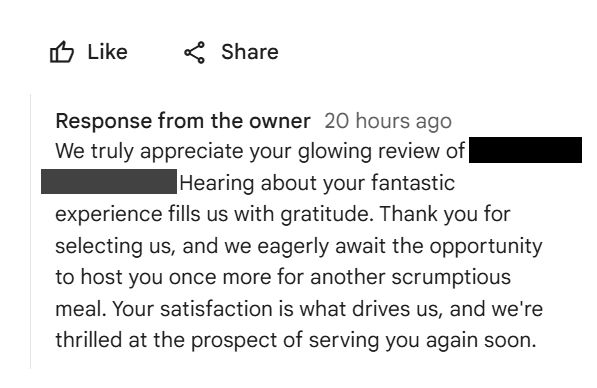
About an hour later, the owner replied. They thanked me for my “glowing review.” They said hearing about my “fantastic experience” filled them with gratitude. They were “thrilled at the prospect” of serving me another “scrumptious meal.”
Does it look like any restaurant personnel read my post or read their reply before it posted? I don’t think so. Here is why:
The two jobs a review reply is supposed to do
Here is the thing that reply missed, and it missed it twice.
A response to a Google review does two separate jobs. Most businesses know about the first one. Almost nobody uses the second.
Job one: it talks to the next customer, not the last one. The person who wrote the review has already eaten, already hired you, already made up their mind. Your reply is for the stranger scrolling your profile next Tuesday, deciding whether to call. That stranger is reading between the lines, looking for whether anyone at your company is actually paying attention.
Job two: it is public, indexable text on your business listing. Your Google Business Profile is one of the few places online where you get handed free space to describe your business, over and over, every time somebody leaves feedback. What you write there sits next to your name in search results and on the map.
“Scrumptious meal” does neither. It does not answer what I wrote. And it tells Google, and every future customer, absolutely nothing about the restaurant — not what they cook, not where they are, not what they are good at.
That is a genuinely wasted opportunity, and it happens thousands of times a day across the metro.
How to actually reply, step by step
The mechanics are simple, and this is where most people get stuck, so let us clear it first.
- Sign in with the right account. It has to be the Google account that owns or manages the Business Profile. This is the single most common reason people cannot find the reply button.
- Search your business name on Google or open Google Maps. If you are signed in as the owner, your profile management panel appears directly in the search results.
- Open your reviews. Look for “Read reviews” or the Reviews tab.
- Click Reply under the review you want to answer, write your response, and post it.
Google’s own help documentation encourages owners to reply to reviews. It is not a gray-area tactic. It is a feature they built and actively tell you to use.
One thing worth knowing: you can edit a reply after you post it. So if something went out that should not have — an automated one that called a mixed review glowing, for instance — you can go back and fix it. Most people never check.
What a good reply actually looks like
Specific. Written like a person who was there. And when the review is a friendly one and you have the room, carrying real information about what you do and where you are.
Take my four-star review. Here is a reply that would have done both jobs, with the owner filling in their own details where the brackets are:
Thanks for taking the time. Glad the service was on point — I will pass that along to the team. We are tucked in to a shopping center in [location] because we want our customers to find us easily and have plenty of parking to serve you well. We like being close to travelers off I-64 and [street] and close to our neighbors that enjoy our wholesome steaks, chicken, seafood, salads and sides. We even have a fully stocked bar if you’d like to try an appetizer and adult refreshment with us. We look forward to providing the same great service to you next time you’re hungry for our flavorful lunches and dinners.
Read that again and notice how much work it is doing. It answers the actual thing I said about the strip mall — and turns it into a reason instead of an apology. It names what they cook. It tells a traveler coming off the interstate that they are close by. It mentions the bar, which the original reply never did.
Anyone reading that learns something true about the restaurant. So does Google.
Nothing in it is stuffed. It is a business describing itself in plain language, in the one public place where customers are already looking. That is the difference between a reply that fills space and a reply that works.
When the review is positive
Thank them by name if they used one. Mention the specific thing they mentioned — the dish, the technician, the turnaround time. Skip the superlatives about yourself. “We are thrilled you had a fantastic experience” is what a robot says. “Glad Mike got the water heater sorted the same day” is what an owner says.
When the review is negative
This is where the money is, and where most businesses panic.
Do not argue. Do not explain why the customer is wrong, even when they are. Everybody reading it later is judging your temperament, not relitigating the sandwich.
Acknowledge the specific problem. Take responsibility for the part that is yours. Then move it offline: give a phone number or an email and offer to make it right. Three or four sentences, maximum.
A calm, specific reply to an angry review does more for your reputation than ten five-star reviews with no response. It shows the next person what happens when something goes wrong — which is the actual thing they are worried about.
When the review is mixed
Mixed reviews — the threes and fours — are the most common and the most ignored. They are also the easiest to answer well, because the customer has already told you exactly what they liked and what they did not. Answer both halves. That is it.
The part almost nobody uses: your replies are searchable
Here is where this stops being customer service and starts being marketing.
The words in your reviews and in your replies are public text attached to your business listing. When somebody in your area searches for what you sell, Google is trying to work out which businesses are relevant to that phrase. The content on and around your profile is part of how it decides.
Nobody outside Google knows the exact weighting, and anyone who tells you they do is guessing. But the direction is not controversial: a profile whose reviews and responses repeatedly, naturally describe a specific service in a specific place is giving search engines a clearer signal than one whose replies all say “thanks so much!”
So when you reply, use the plain words a customer would use:
- What you actually did — “replaced the water heater,” “the brisket,” “your closing paperwork”
- Where you are — the town, the neighborhood, the part of the county
- Who you serve — homeowners, families, contractors, whoever it really is
Not all three in every reply. That reads like a robot too, just a different kind of robot. One, naturally, where it fits.
The same idea, applied earlier: how you ask
There is a second half to this that most owners never think about.
Most review requests say some version of “please leave us a review.” The customer stares at an empty box, writes “great job, very professional,” and moves on. That review is pleasant and says nothing.
But if the request gently reminds them what the job actually was — the service, the town — people tend to write about it. Not scripted, not dictated. Just prompted. Ask a customer “how did the roof repair in Kirkwood go?” and their review will usually mention a roof repair in Kirkwood.
The result is what we would call keyword-rich reviews: real, honest customer language that happens to contain the words other customers are typing into Google. Pair that with replies written the same way, and both sides of the conversation are working for you.
One firm line, though, because this is where businesses get themselves in trouble: never write the review for them, never offer anything in exchange for a review, and never tell a customer what rating to leave. That crosses from prompting into buying, and Google removes reviews and penalizes profiles over it. Prompt the topic. Never the verdict.

Can you remove a fake or unfair review?
Sometimes — but only if it breaks Google’s policies. Google will not remove a review for being negative, and honest criticism stays up no matter how much it stings. What can come down is spam, a review from someone who was never a customer, a conflict of interest, hate speech, or an off-topic rant.
Report it through your profile and be patient; removal is neither instant nor guaranteed. In the meantime, reply calmly and professionally, because future readers are watching how you handle an unfair attack. We walk through the process in how to remove a Google review — just be honest with yourself about whether it is fake or merely unflattering. Google only removes the first kind.
Simple templates you can adapt
Templates are a fine starting point as long as you change them every time. Three to keep on hand:
- Warm positive: “Thank you, [name]! Glad you enjoyed [specific thing]. It means a lot, and we hope to see you back.”
- Rating with no words: “Thanks for the [X] stars, [name] — we appreciate you.”
- Negative: “Thank you for the honest feedback, [name]. I am sorry [specific issue] fell short. I would like to make it right — please contact me directly at [contact].”
The one non-negotiable edit is swapping in the person’s name and a real detail from their review. That single touch is the whole difference between a reply that reads as human and one that reads as automated.
Unrelated, and we know it — dinner in Sunset Hills, sorted.
Four ways businesses get this wrong
1. Publishing automation nobody reads. The example at the top of this article. Software wrote a warm reply to a review it did not comprehend, and an hour later it was live under the owner’s name. Tools are genuinely useful here — drafting replies is exactly the sort of work worth handing off. But a draft is not a decision. Somebody has to read it before it goes out.
2. Using the same template every time. Scroll a profile where all thirty responses open with the identical sentence and you learn something about that business, and it is not good.
3. Keyword stuffing. The opposite failure. “Thank you for choosing our St. Louis plumbing company for your St. Louis plumbing needs, St. Louis’s best plumber.” Customers find it repellent and it works against you.
The line between that and the longer example further up is worth naming, because it is not length. It is repetition. Describing what you genuinely offer — the menu, the parking, the neighborhood, the bar — is a business explaining itself, and every word of it is true. Repeating one phrase three times in two sentences is a business talking to an algorithm. Readers can feel the difference immediately, and so can Google.
4. Only replying to the good ones. Deeply human, completely counterproductive. A wall of cheerful responses with silence under every complaint tells a shopper exactly what happens when things go sideways.
How often, and how fast
Reply to everything. Aim for a few days, not a few months, and move faster on the negative ones — a prompt answer can defuse a complaint before it hardens, while a bad review sitting untouched for weeks signals neglect to everyone who scrolls past.
The exact speed matters less than the consistency. A profile that gets a thoughtful reply on every review, week after week, reads as a business that is genuinely running. Ten minutes a week covers it for most small businesses — but it is ten minutes that never feels urgent, which is why it is the first thing to slide. Turn on review notifications, and put it on the calendar beside your Google Business Profile posts.
And if you have not looked at the rest of your profile lately, replies are only one piece. Our guide to optimizing your Google Business Profile covers the categories, services, photos and hours underneath all of this, and the full profile management guide ties it together. Restaurants have their own quirks, which we get into in local SEO for restaurants in St. Louis.
If reviews are the part that keeps sliding
Answering every review well, every week, is genuinely a chore — and it is the chore most owners drop first. It is also one of the few things you control completely.
Our Diamond plan handles it for you: automated review requests with follow-up for customers who have not left one yet, plus keyword-optimized replies written to support your search visibility with every response. If you would rather keep writing them yourself, the guide above is everything we would tell you anyway.
Not listed with us yet? Listing your business is how neighbors find you when they are searching for exactly what you do.
Frequently asked questions
How do you respond to someone’s Google review?
Sign in to the Google account that manages your Business Profile, search your business name on Google or Maps, open the reviews section, and click Reply beneath the review. Write a short, specific response that addresses what the customer actually said, then post it. You can edit the reply later if you need to.
How do I respond to a Google review?
The same way — through your Business Profile, using the Reply button under each review. The part that matters is not the mechanics but the content: name the specific thing they mentioned, keep it to a few sentences, and write in your own voice rather than a template.
Why can’t I respond to Google reviews?
Almost always it is an account problem. You need to be signed in with the Google account that owns or manages the listing, and the profile has to be verified. If you are signed in as a personal account, or the listing was set up by a former employee or an agency, the Reply button will not appear for you. Claiming or recovering ownership of the profile fixes it.
What is a good example of responding to a review?
A good reply answers the actual comment and sounds human. For a positive review: “Thanks Dana — glad Mike got the water heater replaced the same day. We appreciate you calling us.” For a negative one: “You are right that we were late, and I am sorry. Please call me at [number] and I will make it right.” Short, specific, no superlatives about yourself.
How to reply to Google reviews examples?
Use the review itself as your outline. Thank them, name the specific service or item they mentioned, add one honest detail only someone who was there would know, and close simply. Avoid copy-and-paste templates — a profile full of identical replies is obvious to anyone scrolling, and it defeats the purpose.
How do I comment on someone else’s Google review?
As a business owner, you can only reply to reviews left on your own Business Profile. Regular users cannot comment on another person’s review, though they can mark it helpful or report it if it violates Google’s policies. If a review of your business is fake or breaks the rules, flagging it is the correct route rather than arguing in a reply.
The short version
Reply to every review. Answer what the person actually wrote. Sound like yourself. Use the real words for what you do and where you do it, because that text is working for you long after the customer has moved on.
And whatever tool you use to help — read it before it publishes. Somewhere out there, an owner is being thanked for a glowing review they never received.

Written by a dedicated team of St. Louis locals who live, work, and play right here in the St. Louis metro. Founder Lane Forman and team are committed to building the region’s most trusted directory by verifying listings and connecting local businesses with loyal customers across Missouri and Illinois.